In development · pending Riot and Overwolf review
Pick your comp first.
Keep it on screen.
Double Up Planner is a companion app for Teamfight Tactics Double Up. Build a comp in a desktop window before you queue. During the match, an overlay shows that comp and how far you are from finishing it.
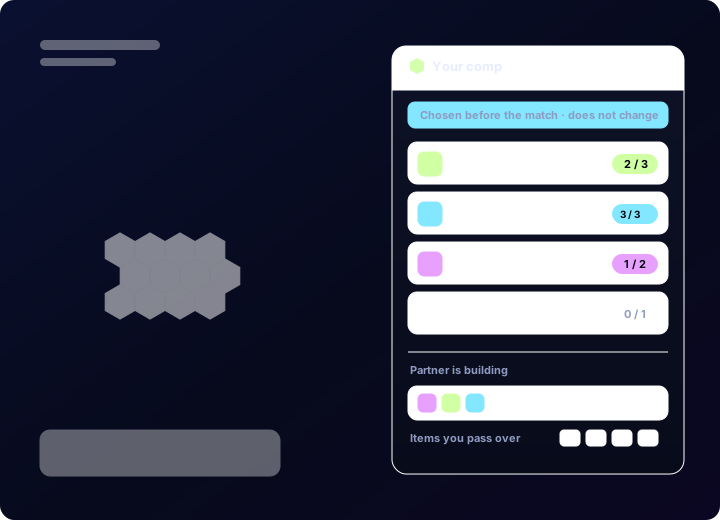
Overlay mockup. Final interface will differ.
Comp builder
Build the comp outside the game
The builder is a normal desktop window. Drag units onto the board, set star levels, and assign items. Trait counts update as you place units, so you can see what a board actually gives you before you commit to it.
Comps save locally. The builder reads and writes the same Team Planner code the game client uses, so a comp can be pasted in from the client or handed to your partner as a string.
- 4×7 board with star levels and item slots
- Live trait counts while you build
- Saved comps stored on your machine
- Import and export in-game Team Planner codes
- Champion and trait data from Community Dragon
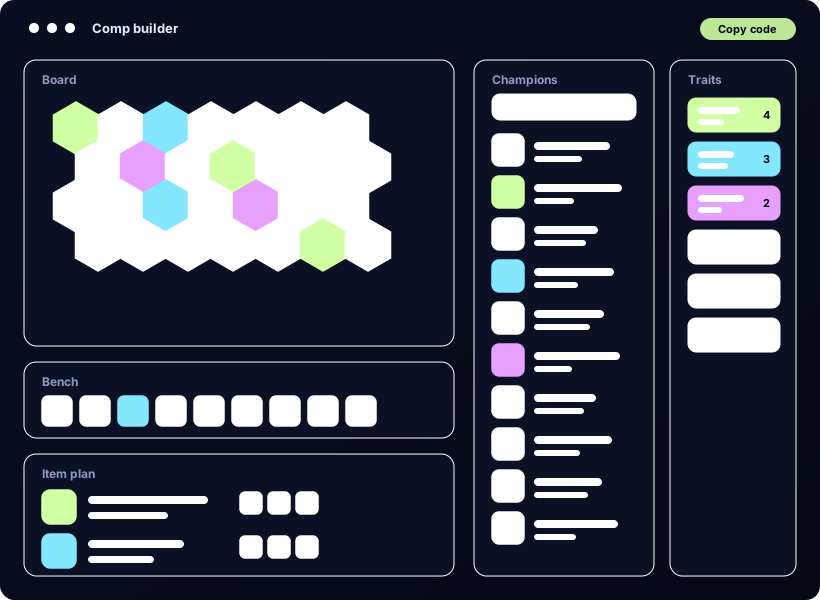
Comp builder mockup. Final interface will differ.
Overlay
The plan stays visible during the match
The overlay appears once a Double Up match starts. It shows the comp you picked before the game: the units in it, how many of each you still need, and the planned items for each carry.
You can move the window anywhere on screen or hide it with a hotkey.
The comp on screen is the one you chose before the game started. It does not change during the match. The overlay gives no in-game advice and reacts to nothing that happens in the lobby.
- Pinned pre-game comp, unchanged for the whole match
- Remaining count per unit
- Planned items per carry
- Movable window, hotkey to hide
- Live game state from Overwolf’s Game Events Provider
Overlay mockup. Final interface will differ.
Why Double Up
Two boards are harder to plan than one
Double Up puts two players on the same team. You share a loss, you pass units and items back and forth, and the two boards have to be decided together. That is a different planning problem from solo play.
01
Most tools ignore the queue
TFT tools are generally built around the standard queue. Double Up gets treated as a variant, so planning two boards ends up in a text file or a Discord message.
02
The decision happens early
Who takes which carry, and who plays the reroll board, is worth settling before the game rather than in the first few rounds.
03
Plans get forgotten
Agreeing on a comp is easy. Remembering the exact item plan for your partner’s carry at stage 4 is not. The overlay keeps it in front of you.
Scope
What it doesn’t do
This app is deliberately limited. The list below describes features it will not have.
× No augment data
No augment statistics, ratings, or recommendations of any kind, at any point.
× No opponent tracking
No scouting, and no player or lobby statistics shown during a game. The app does not read other players’ boards.
× No live recommendations
Nothing on screen changes based on what is happening in the match. The comp shown is the one chosen before the game started.
× No automation
The app does not send input to the game, does not read game memory, and does not capture or analyse the screen.
× No alternative ranking
No MMR or ELO calculators, and no ranking system outside the one Riot provides.
× No hidden information
The app shows nothing that was not already available to the player before the game started.
Data sources. Static set data (champions, traits, items) comes from Community Dragon. Live game state comes from Overwolf’s Game Events Provider, which is the sanctioned way to read Teamfight Tactics game data. Post-game review uses the player’s own match history through the Riot Games API.
Contact
Questions about this app
For anything about scope, data use, or policy, email the developer directly. Riot Games staff reviewing this product registration are welcome to get in touch at the same address.